
Sections
Hero
A large opening banner with an image or video, a heading and up to two buttons.
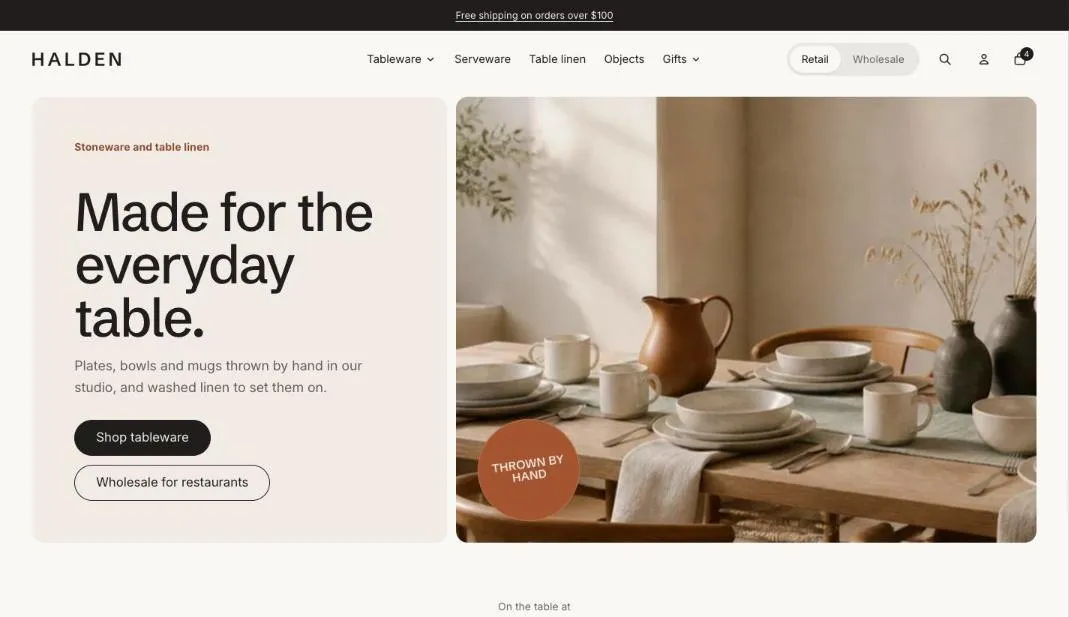
The hero is the first thing shoppers see: a large heading and up to two buttons beside, over or above an image or video. The stage layout centers the text over a wide product shot, which suits cut-out product photos.
Add the section
Section titled “Add the section”- Open Online Store > Themes > Customize and go to the home page (or any template).
- Click Add section and choose Hero.
- Fill in the content, then click Save.
A different button for wholesale customers
Section titled “A different button for wholesale customers”Turn on Different second button for wholesale customers to swap the second button for signed-in wholesale buyers, for example “Your wholesale account” instead of “Become a stockist”. Leave its label empty to hide the button for them.
Section settings
Section titled “Section settings”| Setting | Type | What it does |
|---|---|---|
| Layout | Choice | Text beside image / Text over image / Text above image / Text only. Text above image works best with a wide, cut-out product shot on a transparent or plain background. |
| Height | Choice | Medium / Large. |
| Image | Image | Upload an image or pick one from your files. |
| Phone image | Image | Optional. A taller crop for small screens. |
| Image fit | Choice | Fill / Fit. Fill crops the image to the frame. Fit shows the whole image, which suits product cut-outs and wide line-ups. |
| Video | Video | Plays muted on a loop instead of the image. Keep it short and small. |
| Small heading | Text | A short line above the heading, such as a category or a promise. |
| Heading | Text | Leave empty to hide it. |
| Heading level | Choice | Auto / H1, main heading / H2, section heading. Auto makes this the page’s main heading (H1) when the section is first on the page. Use H2 when the page has its own title further down. |
| Heading size | Choice | Large / Huge. |
| Text | Rich text | Supporting copy under the heading. |
| Button label | Text | Leave empty to hide the button. |
| Button link | Link | A page, product, collection or web address. |
| Second button label | Text | Leave empty to hide the second button. |
| Second button link | Link | A page, product, collection or web address. |
| Different second button for wholesale customers | On or off | Signed-in wholesale customers see this button instead, for example “Your wholesale account” in place of “Become a retailer”. Leave the label empty to hide it for them. |
| Wholesale button label | Text | |
| Wholesale button link | Link | |
| Text panel color scheme | Color scheme |
Blocks
Section titled “Blocks”Sticker
Section titled “Sticker”| Setting | Type | What it does |
|---|---|---|
| Text | Text | A few words, such as Freshly roasted or New flavor. |
| Shape | Choice | Circle / Starburst / Tag. |
| Position | Choice | Top left / Top right / Middle left / Middle right / Bottom left / Bottom right. |
| Tilt | Slider | -20 to 20 °. |
| Motion | Choice | None / Sway / Spin (starburst). |
| Color scheme | Color scheme | One of the schemes from Theme settings > Colors. |
- Use a phone image cropped for portrait screens so the subject stays in view.
- The first hero image loads straight away, so keep it under about 500 KB.