
Sections
Featured product
One product with its media, variant picker and buy buttons on any page.
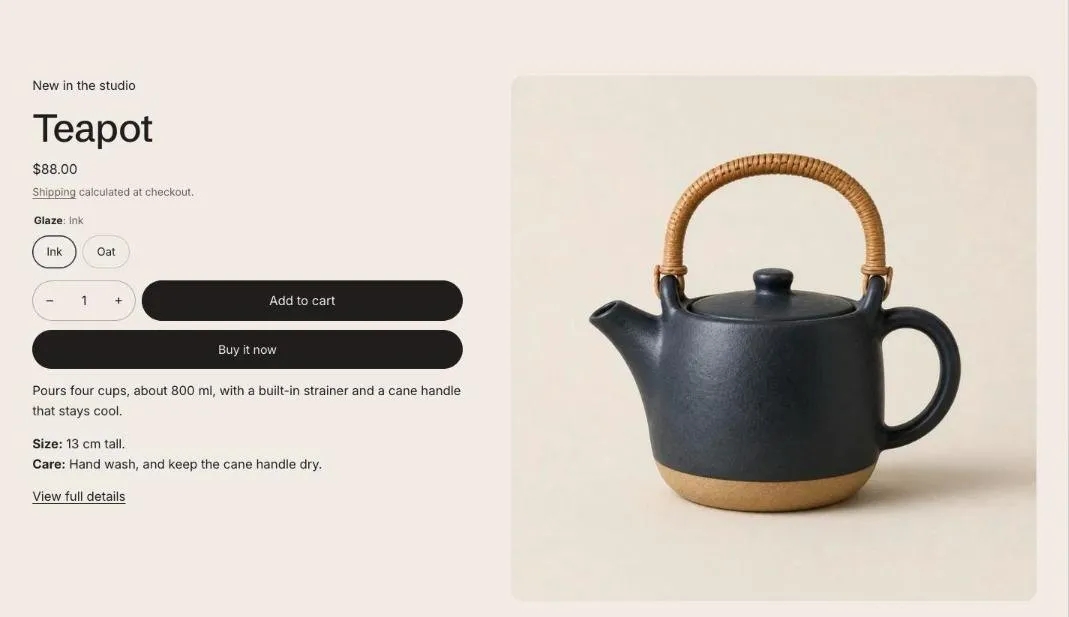
Featured product shows one product anywhere in your store, with its images, video and 3D models, variant picker and buy buttons. It uses the same building blocks as the product page, and picking a variant here doesn’t change the page address.
Add the section
Section titled “Add the section”- Open Online Store > Themes > Customize and go to the home page (or any template).
- Click Add section and choose Featured product.
- Fill in the content, then click Save.
Section settings
Section titled “Section settings”| Setting | Type | What it does |
|---|---|---|
| Product | Product | |
| Color scheme | Color scheme | One of the schemes from Theme settings > Colors. |
| Show “View full details” link | On or off | |
| Media | ||
| Media position on larger screens | Choice | Left / Right. |
| Show thumbnails | On or off | Shows one image at a time with thumbnails under it. Turn off to show all media in a grid on larger screens and swipe through it on phones. |
Blocks
Section titled “Blocks”You can add up to 16 blocks.
Adds a block from an installed app, such as reviews or subscriptions. Only apps that offer app blocks show up here.
Vendor
Section titled “Vendor”This block has no settings. Drag it to change where it shows.
This block has no settings. Drag it to change where it shows.
Rating
Section titled “Rating”| Setting | Type | What it does |
|---|---|---|
| Reviews section ID | Text | Optional. The ID of your reviews app’s section, so the rating links to the reviews. |
This block has no settings. Drag it to change where it shows.
| Setting | Type | What it does |
|---|---|---|
| Show “Only X left” at or below | Slider | 1 to 30. |
| Show stock bar | On or off | |
| Show “In stock” above the threshold | On or off | |
| Pre-order message | Text | For variants set to keep selling when out of stock. Leave blank to hide. |
Variant picker
Section titled “Variant picker”| Setting | Type | What it does |
|---|---|---|
| Style | Choice | Buttons / Dropdown. Options with swatches always show as swatches. |
Buy buttons
Section titled “Buy buttons”| Setting | Type | What it does |
|---|---|---|
| Show quantity selector | On or off | |
| Show dynamic checkout buttons | On or off | Shows the payment methods your store offers, such as Shop Pay or PayPal. |
| Show recipient form for gift cards | On or off | Lets customers send a gift card directly to someone, with a personal message. |
Description
Section titled “Description”This block has no settings. Drag it to change where it shows.
| Setting | Type | What it does |
|---|---|---|
| Text | Rich text | Supporting copy under the heading. |
Custom Liquid
Section titled “Custom Liquid”| Setting | Type | What it does |
|---|---|---|
| Liquid code | Liquid | Add app snippets or other code to create advanced customizations. |
- Add app blocks for reviews or subscriptions, just like on the product page.
- Turn on Show “View full details” link so shoppers can reach the full product page.