
Sections
Contact form
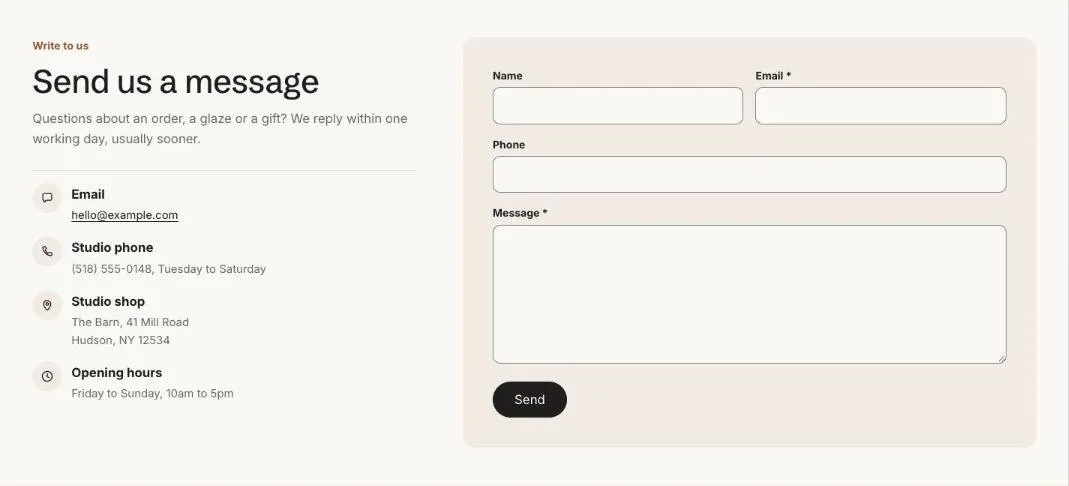
A contact form with your contact details beside it.
Contact form sends messages to your store’s sender email, set in Settings > Notifications. Add Contact detail blocks for your email, phone, hours or address beside the form. On a page it can show the page’s own title and content, so it can be the whole contact page.
Add the section
Section titled “Add the section”- Open Online Store > Themes > Customize and go to a page using the page.contact template.
- Click Add section and choose Contact form.
- Fill in the content, then click Save.
Section settings
Section titled “Section settings”| Setting | Type | What it does |
|---|---|---|
| Show the page’s title and content | On or off | On a page, the heading defaults to the page title and the page’s text appears under it, so this section can be the whole contact page. |
| Small heading | Text | A short line above the heading, such as a category or a promise. |
| Heading | Text | Leave empty to hide it. |
| Heading level | Choice | Auto / H1, main heading / H2, section heading. Auto makes this the page’s main heading (H1) when the section is first on the page. Use H2 when the page has its own title further down. |
| Text | Rich text | Supporting copy under the heading. |
| Show to | Choice | Everyone / Everyone except wholesale customers / Wholesale customers only. Wholesale customers are shoppers signed in to a B2B company. The section always shows in the theme editor. |
| Color scheme | Color scheme | One of the schemes from Theme settings > Colors. |
Blocks
Section titled “Blocks”You can add up to 6 blocks.
Contact detail
Section titled “Contact detail”| Setting | Type | What it does |
|---|---|---|
| Icon | Choice | Message / Phone / Location / Hours / Delivery / Person. |
| Title | Text | |
| Text | Rich text | Supporting copy under the heading. |